
It’s time to dive into one of the most critical phases of the DevOps lifecycle: testing. Testing is a cornerstone of software development—it ensures that applications behave as expected, meet design and acceptance criteria, and catch deficiencies before they reach end users.

When used effectively, testing is designed to identify whether a change to a system has introduced an issue. If a system were perfectly static and never changed, there would be no reason to expect anything to break. In that fictitious scenario, testing wouldn’t be necessary. But in the real world of development and DevOps, change is synonymous with value. We evolve applications and systems to deliver new features, security enhancements, and performance improvements. If we’re making changes without adding value—or at least intending to—we need to re-evaluate our purpose.
While testing is often associated with software development, DevOps demands that we broaden our perspective to include operations. Testing is just as vital to operations as it is to development. Performance testing ensures responsiveness, load testing verifies scalability, and stress testing helps us understand breaking points and how the system handles them. Every change to our application or infrastructure alters system parameters—and that means it’s time to re-test. This is the DevOps feedback loop in action. With each iteration, we rely on test data to determine whether our changes have negatively impacted the system. If they have, we want to catch it early and address it swiftly.
Traditionally, testing has been the domain of dedicated QA teams. DevOps challenges this siloed model by promoting a culture of shared responsibility. Developers, operations engineers, and testers all contribute to quality assurance. Testing is no longer a final checkpoint—it’s a continuous, collaborative effort embedded throughout the lifecycle. When everyone owns quality, bugs are caught earlier, feedback is richer, and the system becomes more resilient.
Blameless Culture and Continuous Learning
DevOps fosters a blameless culture, especially when tests fail or defects slip through. Instead of assigning blame, teams conduct retrospectives to understand what went wrong and how to improve. This mindset creates psychological safety, which is essential for innovation and continuous improvement. A failed test isn’t a failure—it’s a signal, a learning opportunity, and a chance to strengthen the system. When teams treat testing outcomes as valuable feedback rather than judgment, they build trust and accelerate progress.
Test-Driven Development and the Quality Mindset
Another cultural shift in DevOps is the embrace of test-driven development (TDD). In TDD, developers write tests before writing the actual code, using those tests to guide design and functionality. This approach reinforces a quality-first mindset and ensures that validation is built into the process from the start. While TDD isn’t universally adopted, its principles—thinking through edge cases, defining expected behavior, and writing testable code—are deeply aligned with DevOps values.
Automation and Shift-Left Testing
Because testing is iterative within the DevOps lifecycle, it must happen on every pass through the loop. That’s why automation is essential. Frequent testing means repetition, and automation allows us to execute tests consistently and efficiently, reducing effort and time.
Equally important is the concept of shift-left testing. Shift-left means moving testing earlier in the process to get feedback sooner. Early feedback allows us to pivot quickly and respond to changing needs. Making changes late in the process is more expensive—in terms of time, effort, and money. Shift-left testing encourages us to test earlier in the lifecycle, when changes are least costly.
A simple example of shift-left is peer review. Technically, we could build an entire application before seeking feedback—but that’s risky. Instead, we might review at project milestones. Even better, we can review pull requests as each feature is completed. And further left still is pair programming (which we discussed in the article on the code phase). With two people working together in real time, peer review happens in the moment—mistakes are caught, feedback is immediate, and adjustments are made as code is written.
Types of Testing in DevOps
Testing in DevOps spans a wide spectrum—from fast, granular checks to comprehensive system-wide validations. At the foundation are unit tests, which validate individual components or functions in isolation. These are fast, inexpensive, and provide immediate feedback to developers. Next are integration tests, which ensure that different modules or services work together as expected. End-to-end tests simulate real user workflows across the entire system, verifying that the application behaves correctly from start to finish.
Beyond these core categories, DevOps embraces performance testing to measure responsiveness, load testing to assess scalability under expected traffic, and stress testing to identify breaking points under extreme conditions. Security testing is increasingly vital, especially in automated pipelines, helping teams catch vulnerabilities before they reach production. Regression testing ensures that new changes don’t unintentionally break existing functionality, and acceptance testing validates that the system meets business requirements and user expectations.
The Testing Pyramid: Fast Feedback First
To guide how tests are balanced and prioritized, DevOps teams often rely on the testing pyramid. This model emphasizes a broad base of fast, low-cost tests—such as unit tests—a moderate layer of integration tests, and a narrow top layer of slower, more expensive tests like end-to-end or UI tests. The pyramid helps teams optimize for speed, reliability, and maintainability. Since unit tests are quick to run and easy to isolate, they provide rapid feedback and catch issues early, making them ideal for frequent execution in CI/CD pipelines.

As we move up the pyramid, tests become broader in scope but also slower and more brittle. End-to-end tests, while valuable, can be time-consuming and prone to false positives due to environmental dependencies. That’s why they’re used sparingly and strategically. The pyramid encourages teams to invest heavily in foundational testing while being deliberate about where and how to apply higher-level tests. This balance ensures fast feedback, deep coverage, and a system that remains agile and resilient.
Within the context of our SaaStronaut project, we’ve already implemented unit tests and integrated them into our CI pipeline. These fast, focused tests form the foundation of our testing strategy—the base of the pyramid—where the majority of our effort should remain concentrated. As we move upward, we’ll begin incorporating UI-level tests using Playwright.
Introducing Playwright for UI Testing
Playwright is an open-source automation framework developed by Microsoft for end-to-end testing of web applications. It enables developers and testers to simulate real user interactions across multiple browsers—including Chromium, Firefox, and WebKit—using a single API. This cross-browser capability ensures consistent behavior and performance across platforms, which is essential in today’s fragmented device landscape.
Playwright supports both headed and headless modes (with or without rendering the UI), integrates seamlessly with CI/CD pipelines, and offers powerful features like auto-waiting for elements, capturing screenshots and videos, and parallel test execution. It also provides robust support for modern web architectures, including single-page applications (SPAs), and handles complex scenarios like authentication flows and network mocking. By enabling fast, reliable, and scalable UI testing, Playwright helps teams catch visual and functional regressions early—making it a vital asset in the test phase of any DevOps cycle.
Once our Playwright tests are written, we’ll want to ensure they’re incorporated into our pipeline. Automation remains a key driver, so our application code should be automatically deployed to a test environment, with tests executed without human interaction—delivering fast feedback on every change.
A Note on Playwright Test Runner for JavaScript/TypeScript
While this article focuses on using Playwright with .NET and NUnit, it’s worth noting that Playwright also offers a native test runner for JavaScript and TypeScript projects: @playwright/test. This built-in runner is designed specifically for end-to-end testing and comes with features like parallel execution, built-in reporters, automatic retries, and rich assertion libraries—all tailored for modern web development workflows.
For teams working in Node.js environments, the Playwright Test Runner provides a streamlined experience with minimal setup. It integrates tightly with VS Code, supports test annotations, and offers powerful CLI tooling for filtering, debugging, and tracing test runs. If your stack leans toward JavaScript or TypeScript, this runner may be the most natural fit.
That said, Playwright’s flexibility is one of its strengths. Whether you’re working in .NET, Python, or JavaScript, Playwright adapts to your ecosystem—making it a versatile choice for UI testing across diverse DevOps pipelines.
Setting Up Playwright in SaaStronaut
I’ve created a new project as part of the SaaStronaut solution. If you recall from our earlier architectural discussions, SaaStronaut is a Blazor web app that serves as the front end of our system.
Visual Studio includes project templates for Playwright test projects. I selected the NUnit Playwright Test Project template and added it to our solution.

The template includes a new test class and a first “Hello World” test. Here’s what the test does:
- Navigates the browser to the Playwright web page and validates the page title using regex.
- Creates a locator (a reference to an object on the page) using the text property as the selection criteria.
- Validates that the located object has the expected value for its href attribute.
- Performs a click action on the object, navigating to the linked page.
- Verifies that the new page URL matches the expected value after the click.
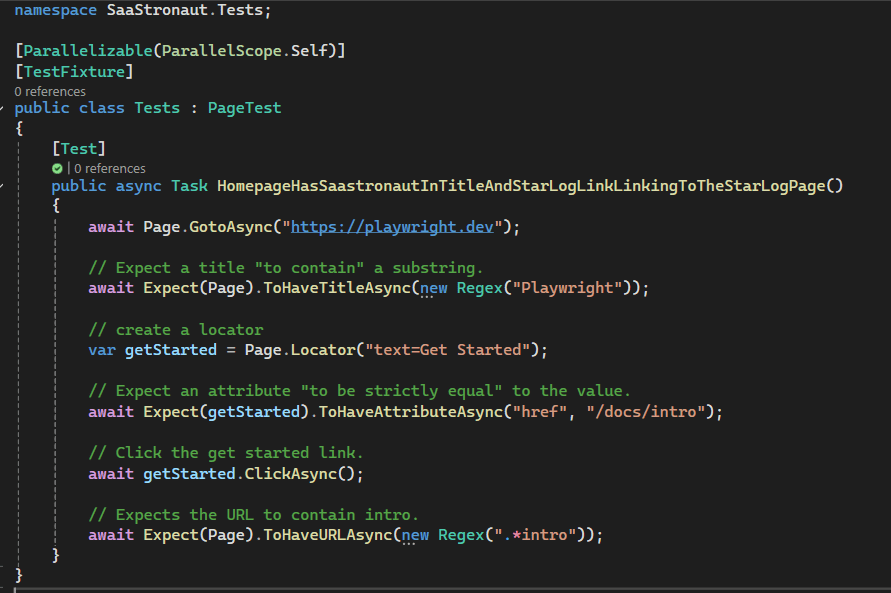
Running this test from Visual Studio’s Test Explorer initially results in a failure—one more issue to resolve. Playwright depends on specific browser binary versions to operate. The error message indicates these are missing, and a PowerShell script in the project’s bin directory is provided to facilitate setup.

By locating and running the PowerShell script with the install parameter, the required binaries are downloaded. Once installation is complete, rerunning the test results in a successful pass!
Key Concepts in Playwright
This simple test illustrates several important concepts:
- Locators and Selectors: These form the backbone of UI interaction. Selectors are strings used to identify elements—such as CSS selectors, XPath, or text queries—while locators are Playwright’s higher-level abstraction that builds on selectors. Locators automatically wait for elements to be ready and offer chainable methods, making tests more reliable and expressive.
- Actions: These are operations performed on elements, such as clicking buttons, typing into fields, or hovering over menus. Playwright ensures actions are executed only when the target element is stable—visible, enabled, and ready—reducing test flakiness.
- Assertions: These validate expected outcomes, confirming that the UI behaves as intended. Playwright integrates with test runners like Playwright Test and supports rich assertions, such as checking element visibility, text content, or attribute values. Assertions help catch regressions early and ensure the application meets functional and visual requirements.
With these core concepts in place, we can begin building a suite of tests to validate the functionality of our SaaStronaut application. Following the example above, I’ll create tests to verify page load behavior and ensure our core UI components are present and displaying correctly.
Looking Ahead
As we iterate through future cycles of the DevOps lifecycle and add new features to SaaStronaut, I’ll continue expanding our test coverage. This is essential not only for validating new functionality across various scenarios but also for laying the groundwork to detect regression errors as we evolve the system. I’ll keep the testing pyramid in mind—focusing most of our effort on foundational tests, with UI tests reserved for validating end-user experience and component integration.
The goal of this article isn’t to provide an exhaustive deep dive into Playwright, but rather to offer a practical example of testing within a DevOps process. If you’re interested in exploring Playwright further, I highly recommend checking out the official getting started documentation. https://playwright.dev/docs/intro
Integrating Playwright Tests into the Pipeline
With our first few Playwright tests written, it’s time to incorporate them into our pipeline. I’ve chosen to use a secondary pipeline file for these tests for a few key reasons. Most importantly, I want a separate trigger for this pipeline—distinct from the one that compiles our code and runs unit tests.
Our build and unit test pipeline should run on every commit. We want fast feedback, and unit tests—being low on the testing pyramid—are fast and inexpensive. UI tests, on the other hand, don’t need to run on every commit. Instead, I want them to run when a pull request is created. When a feature is ready for review, this pipeline will deploy the application and execute the Playwright tests.
This approach also ensures that the version of the application under review is deployed and available for use during the review process. With the help of infrastructure as code, I plan to extend this further by creating ephemeral test environments for each feature. These environments will allow independent validation of work, and once the pull request is completed and the code is merged, the test environment will be automatically deleted.
DevOps is all about iteration, so I’ll start with a single test environment for now—knowing that it will become a bottleneck in the future, and that I’ll need to scale to support my vision of ephemeral environments.
Building the Pipeline
Let’s take a look at the pipeline file for this testing process. I’ll also use the Task Assistant in Azure DevOps to provide context for some of the settings and values we’re working with:

- Trigger: Set to none, as we won’t use a CI trigger. Instead, we’ll configure it to run on pull request creation.
- Pool: We’ll use the latest Ubuntu image. Since we’re cross-platform with .NET 9, Ubuntu is a fast and lightweight choice.
For the tasks in our pipeline, we’re using many of the same ones we’ve seen before:
- UseDotNet: Installs the .NET 9 SDK used by our project.
- .NET Core Tasks: Restore and build the project. We also add a publish command to package the application into deployable components. Additionally, we zip the files into a single deployable package.
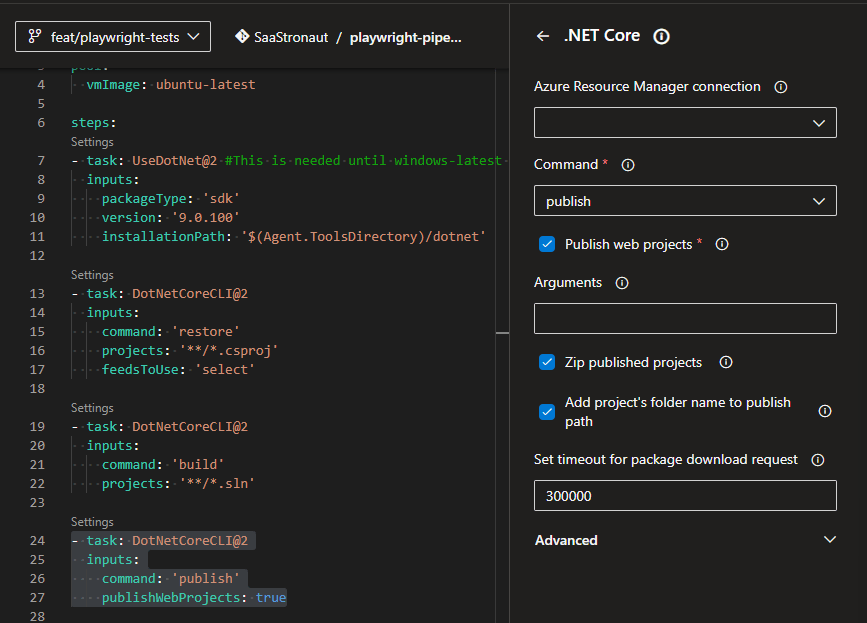
Next, we deploy the app to our Azure resources using the Azure App Service Deployment task. We specify our Azure subscription, the type of App Service, the name of the service, and the location of our deployment package—the zip file created in the previous step. With these details, the pipeline deploys our SaaStronaut web application to the test environment.

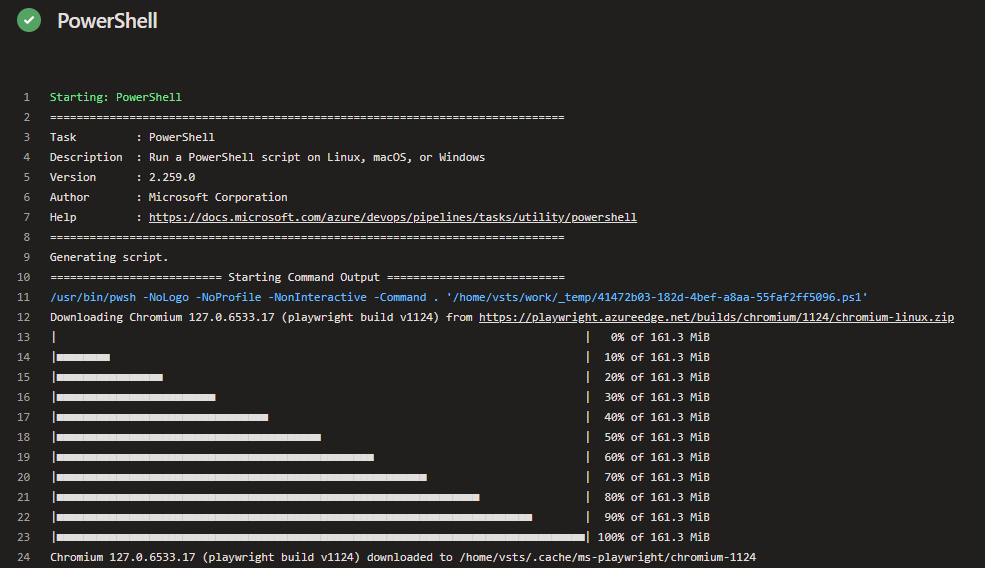
After deployment, we prepare the environment to run Playwright tests. As mentioned earlier, Playwright requires specific browser binaries. We use a PowerShell task to run the install script from our project’s bin directory, ensuring the build agent is ready to execute tests.

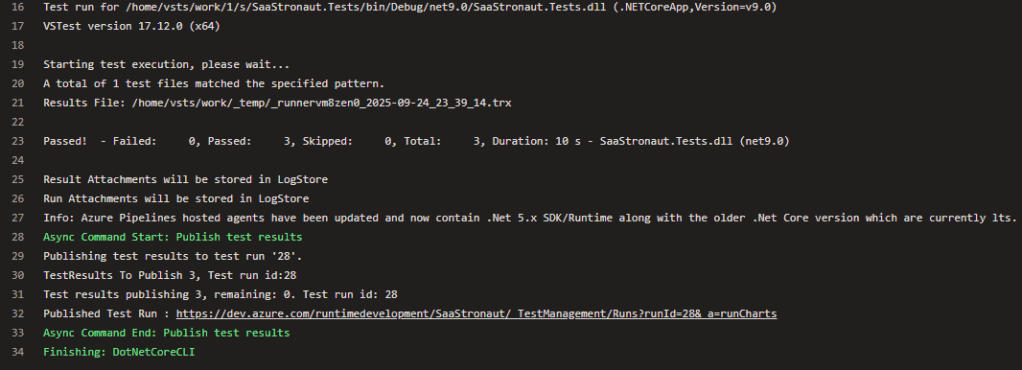
Finally, we run the Playwright tests using the .NET Core test command.
When we manually kick off the pipeline, we can watch it come to life. Each step provides logs and details on task execution. In the PowerShell task for browser binaries, we see the environment being prepared.
In the test execution task, we see our Playwright test project running all its tests. The output is captured in the logs, and NUnit automatically generates a results file that Azure Pipelines can consume.
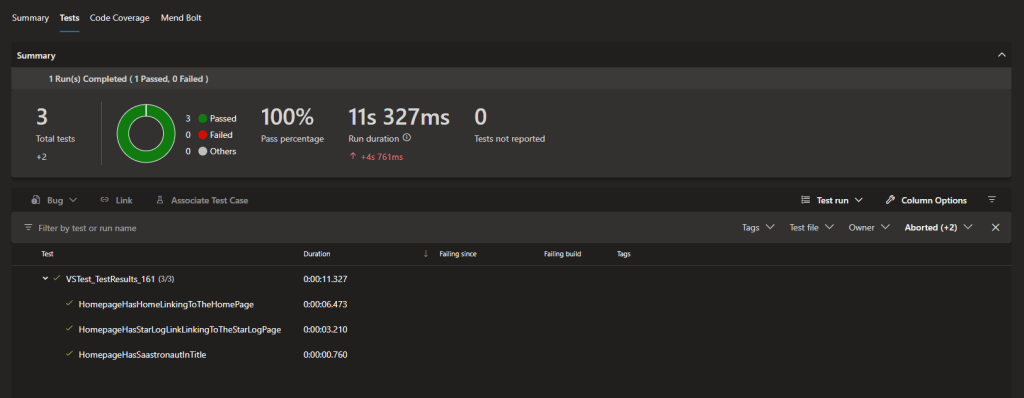
The pipeline overview includes a Tests tab, showing a breakdown of executed tests, their duration, and any failures.
Enforcing Pipeline Execution on Pull Requests
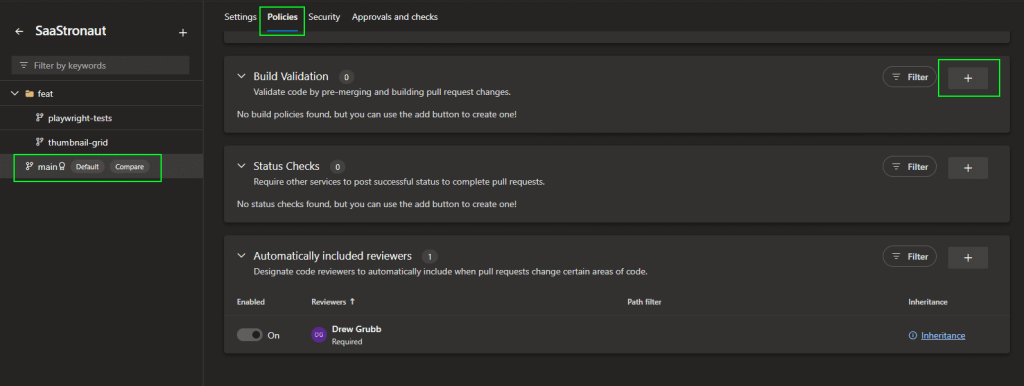
The final step is to configure the pipeline to run when a pull request is created. This ensures the test environment is ready with the new code and prevents the pull request from being completed until the pipeline finishes successfully. If any Playwright tests fail, they must be resolved before merging.
I head to the repository settings in Azure DevOps, specifically the policies for the main branch of the SaaStronaut repository. Under Build Validation, I add a new build policy.
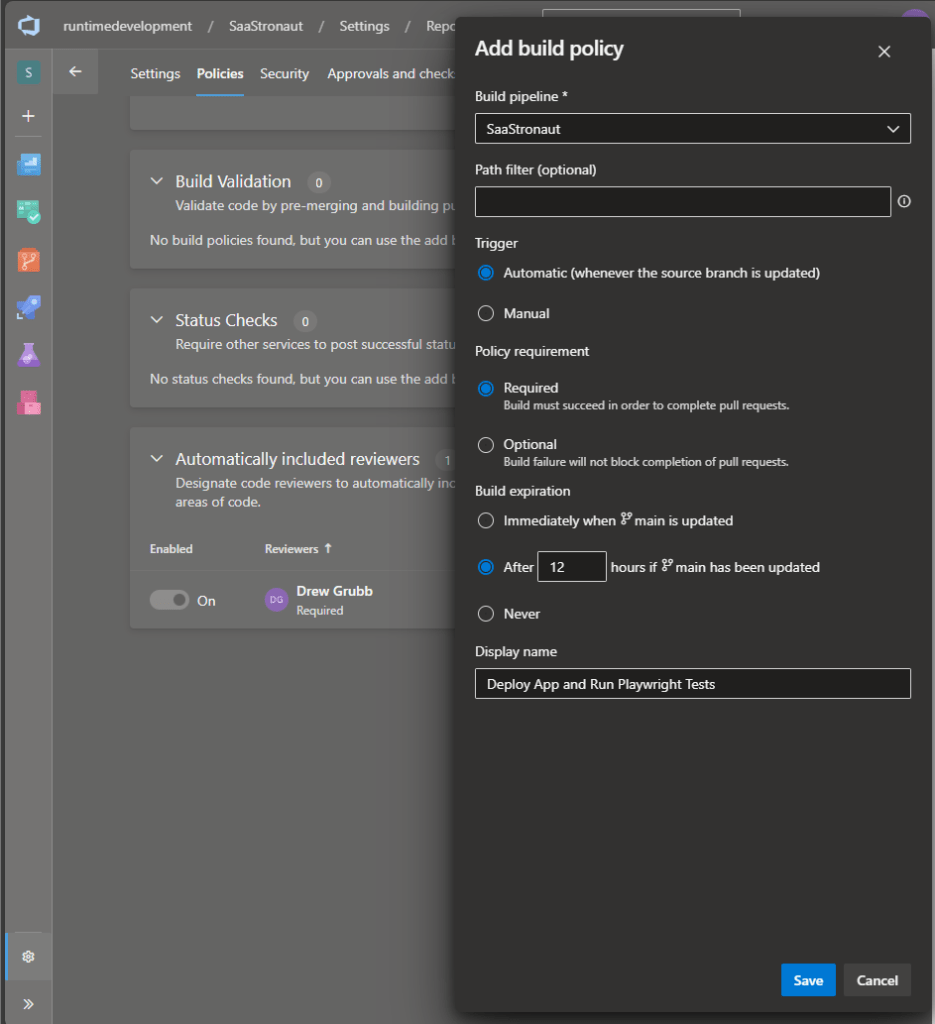
I select the SaaStronaut Playwright pipeline, make it a requirement for completing pull requests, and leave the default setting to expire the build after 12 hours if the main branch is updated. I name the policy “Deploy App and Run Playwright Tests” and click save.
Now, when I create a pull request, the pipeline kicks off automatically. I can view the results directly from the pull request.

After just a minute, the pipeline completes successfully, and I’m able to finalize the pull request once the team approves the changes.
Scaling Across Microservices
Because SaaStronaut is built using a microservice architecture and follows a micro-repository pattern, I’ll replicate this structure—creating dedicated tests and associated pipelines—for each repository. This ensures consistent quality across the entire system and reinforces our DevOps commitment to automation, feedback, and continuous improvement.
Wrapping Up: Testing as a DevOps Superpower
In this article, we explored the vital role of testing within the DevOps lifecycle—not as a final hurdle, but as a continuous, collaborative force for quality. We examined how testing spans both development and operations, how it thrives in a culture of shared responsibility, and how practices like test-driven development, shift-left testing, and automation help teams deliver faster, safer, and more resilient software.
We also walked through the testing pyramid, emphasizing the importance of fast, foundational tests and the strategic use of UI-level validations. Through our SaaStronaut example, we saw how Playwright can be integrated into a CI/CD pipeline to provide meaningful feedback during pull requests, and how infrastructure as code can pave the way for ephemeral test environments that scale with our ambitions.
Testing isn’t just about catching bugs—it’s about enabling change with confidence. It’s the heartbeat of a healthy DevOps cycle, providing the feedback we need to iterate, improve, and innovate.
In the next article of this series, we’ll shift our focus to the release phase—where all the hard work culminates in delivering value to users. We’ll explore strategies for safe and efficient releases, including blue-green deployments, feature flags, and progressive delivery techniques that help teams release faster without sacrificing stability.
Stay tuned—because DevOps doesn’t stop at testing, and the journey from commit to customer is just getting started.
 Drew Grubb - Runtime Development